Common Wall Printer Problems and How to Fix Them Fast
When your wall printer breaks down at the worst possible time, like right before a big project due date, every minute of downtime means lost income and angry clients. We know how hard this is because we've worked with a lot of businesses that have had the same problems. Wall printers have changed the way we do large-format vertical printing, from outdoor advertising campaigns to intricate murals and directional signs in parking lots. But, like any complex piece of equipment, they sometimes have problems that need immediate attention and workable solutions.
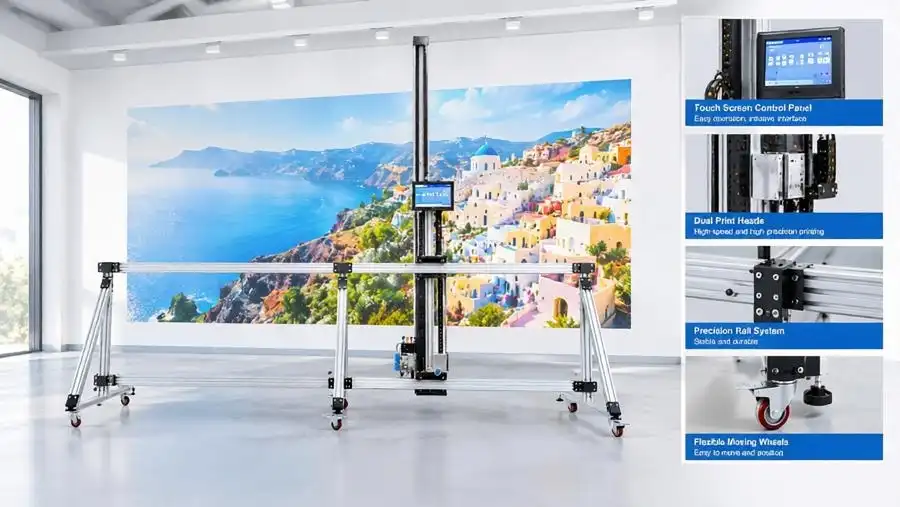
Understanding Common Wall Printer Problems
When you use a wall printer in a busy business setting, you will surely run into technical problems that can slow you down if you don't fix them quickly. We've learned from years of industry experience and customer comments what the most common problems are that slow down different types of work.
Print Head Clogging and Nozzle Blockages
The most common problem users have is that the print head gets clogged. This problem usually happens when the ink dries out in the nozzles between printing sessions or when particles build up from ink formulations that don't work well together. This leads to output that is streaky, missing color channels, or printing failure that doesn't work at all. Environmental factors are very important. For example, dust particles in outdoor ads or changes in temperature in warehouses can make clogging happen faster. We've seen that machines that use fast-dry ink technology need extra careful nozzle upkeep. However, this feature also greatly speeds up project completion when used correctly.
Calibration and Alignment Issues
When printing continuous designs or text across big wall surfaces, any misalignment is immediately clear. The feature that lets you print on materials of any width relies on the wall printer movement system and print head settings being perfectly calibrated. These important settings can be thrown off by shaking during transport, mounting brackets that are too loose, or old mechanical parts. There is a lot of calibration drift in shopping mall installations and indoor decorating projects because clients expect perfect color matching and pattern consistency across whole walls.
Software and Connectivity Glitches
Modern wall printers use complex software to turn digital designs into printed materials. We've seen operators have trouble with dropping USB connections, Wi-Fi interference in busy business areas, and software compatibility problems after updating the operating system. These issues usually show up as partial file transfers, skewed images, or the inability for the computer system and printer hardware to communicate at all. It's even more frustrating when you have to finish jobs quickly for advertising clients or government community installations.
Material Compatibility and Adhesion Problems
Different surfaces in wall printing machines make it harder for ink to stick and for colors to stay bright. What works great on smooth latex-painted walls might not work at all on rough concrete or ceramic tile floors. We have records of situations where workers had trouble with cement floors in parking lots not sticking or with terrazzo surfaces changing color. Knowing how to prepare the medium is important whether you're printing on plaster walls, wood, or stone. This will keep your clients happy and save you money on repeats.
Every mechanical system has to deal with hardware wear over time. During operation, the vertical rail systems, print head carriages, and motor units are all constantly moving. When bearing surfaces wear down, drive belts stretch, and electrical connections become loose, it can cause mistakes in positioning, speeds that don't match up, or even total mechanical failure. Outdoor advertising uses equipment that is subjected to more external stresses that speed up component degradation compared to controlled indoor settings.
Step-by-Step Solutions to Fix Wall Printer Problems Fast
A methodical approach to troubleshooting wall printer problems that goes from simple checks to more complicated actions is needed to quickly fix technology issues. We came up with this way by helping with thousands of setups around the world.
Resolving Print Head Clogs
Run the automated nozzle check pattern on your wall printer's maintenance page. This diagnostic print shows blocked colour channels. Start the system's built-in cleaning cycle when clogs appear. Many systems feature light, medium, and deep cleaning options. Light washing solves minor issues. For stubborn obstructions, intensive cleaning uses more ink yet entirely clears print head channels. Wait 10–15 minutes between cleanings to let the cleaning solution treat dried ink. After automated cleaning fails, manual cleaning is needed. Remove the print head assembly and immerse the afflicted nozzles in a cleaning solution for 30–60 minutes, according to the manufacturer. Avoid abrasive materials that might harm sensitive nozzle plates. Professional print heads are precision-engineered; therefore, hand-cleaning them requires attention.
Fixing Calibration and Alignment
Make sure the wall printer mounting mechanism is solid and level before calibrating. Make sure the rail system is straight horizontally and vertically using a precision level. Even tiny changes cause large print errors. Create test designs that indicate the misalignment's size and direction using your control software's calibration tool. Modern multi-axis systems allow you to modify element spacing, vertical position, and alignment in each direction individually. After adjustments, print a one-meter proof pattern to verify. Writing down your calibration settings helps you discover them later, particularly if you operate on several jobsites in varied climates.
Addressing Software and Connectivity Issues
Simple things create connection difficulties. Make sure all cables are properly linked to their ports and check for cable sheathing or connection damage. USB connectors should click when properly plugged in. Check signal strength before joining wirelessly. Physical barriers between the wall printer and access point reduce connection reliability. Install the latest wall printer firmware and control software. Manufacturers often release interface updates to improve wall printer performance. Try shrinking photo files or changing file types if you're having problems delivering them. Complex images with multiple layers or styles might be too much for the computer. When software faults prevent the wall printer and control computer from communicating, rebooting them solves it.
Solving Material Adhesion Problems
How well something clings to various media relies on surface preparation. Concrete floors and walls must be thoroughly cleaned to remove dust, oils, and other pollutants. Some surfaces benefit from priming, which helps ink stay and colours stand out. Before printing large areas, try printing tiny ones. See whether binding or colour accuracy issues exist. Adjust ink density depending on porosity. Highly absorbent surfaces like untreated plaster need more ink than protected ones. UV systems cure ink differently depending on temperature. Installation environments range from climate-controlled retail malls to open-air parking garages, so maintain specified operating temperatures.
A shopping center promotional wall had several bands, according to an advertising company. Initial testing found a worn drive belt causing irregular print speeds. After replacing the belt and recalibrating the motion system, output was great. The whole repair took less than two hours, allowing for on-time completion.
Preventive Maintenance Tips for Longevity and Reliability
Regular repair of wall printing machines cuts down on surprise breakdowns and increases the useful life of equipment. These suggestions were made using performance data from wall printer systems that were used in a range of situations.
Daily Maintenance Checklist
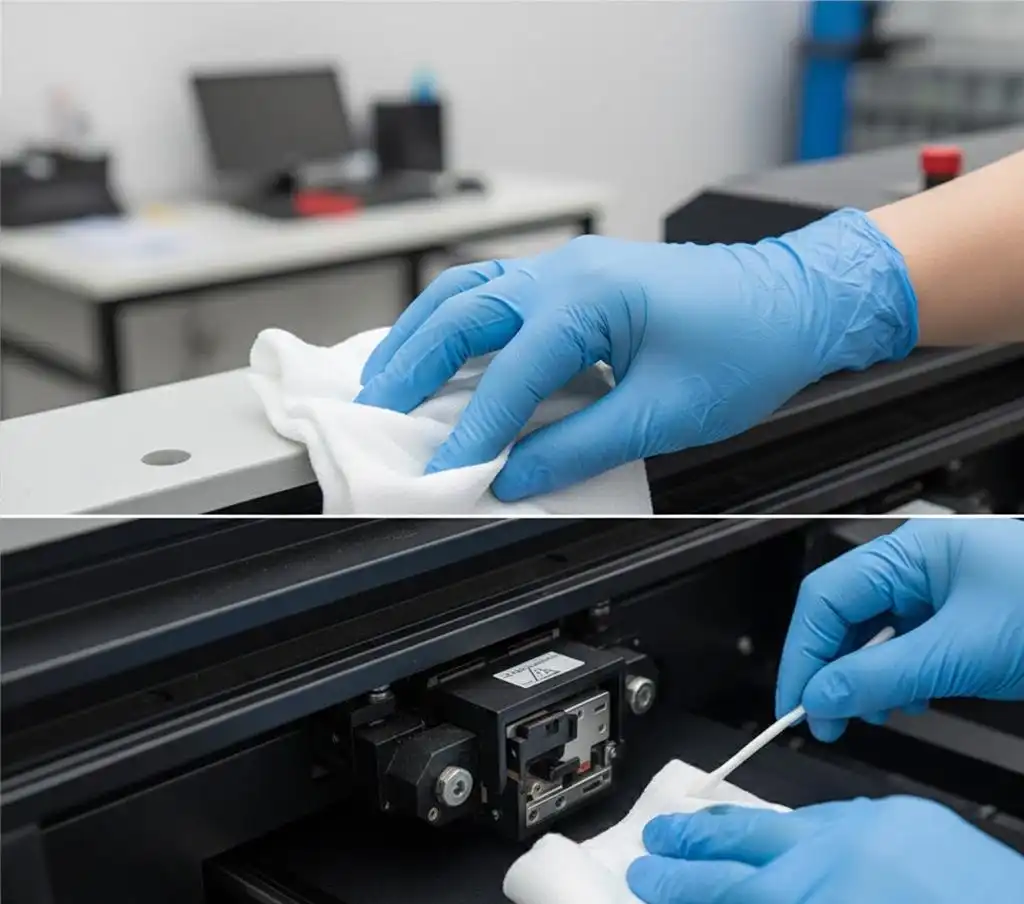
Everyday tasks lay the groundwork for smooth operation. Run a nozzle check pattern every morning before production starts to make sure that all color channels are fully fired. Clean the outside of things to keep dust from building up near sensitive parts. Check the print head unit for any ink buildup that you can see, and then wipe it down with the right materials. Check the amount of ink in the tanks and fill them up as needed. Letting the tanks run dry adds air to the ink system, which causes more problems. Make sure the wall printer moves easily along its rail system and doesn't make any strange noises or jam. These quick checks only take ten to fifteen minutes, but they find problems early on, before they slow down production.
Weekly Maintenance Procedures
Every week, maintenance takes care of areas that wear down over time. Clean the rail system completely and lubricate the bearing surfaces according to the manufacturer's instructions. Check all of the wire links for signs of damage or loosening. When you clean the area around the wall printer, pay attention to any airflow holes that might get clogged with dust. Even if you check the wall printer every day and see no problems, run an extended nozzle cleaning cycle. This stops clogs from happening before they hurt print quality. Look over your most recent print jobs to see if there are any trends of quality loss that could mean that hardware or software problems are starting to show up.
Monthly Maintenance Activities
The monthly procedure includes more extensive inspections. Look for cracks, coating, or additional slack in motor parts, drive belts, and pulleys. Check all limit switches and sensors that assist the wall printer in locating and staying safe. Print test patterns and compare to baseline data to verify calibration. Get the latest software and hardware. Electrical air filters should be cleaned or changed. Record all equipment maintenance activities and notes. This will reveal wear patterns and allow you to replace parts before they break.
Your best maintenance investment is operator training. Well-trained workers can recognise early warning signals, perform routine activities, and determine when professional support is required based on correct information. Set up supported repair schedules with the equipment seller that include in-house procedures and periodic expert inspections. Use manufacturer-approved inks and cleaning solutions to avoid compatibility issues that may invalidate warranties and harm pricey equipment. Modern control systems provide real-time performance diagnostics. Learn to read these indicators to prevent complications.
Comparing Wall Printer Technologies and Their Impact on Problem Frequency
The choice of technology has a big effect on how reliable operations are and how much maintenance is needed. Knowing these differences helps buying teams make smart choices that meet the needs of specific applications.
Inkjet vs. UV Printing Systems
Traditional inkjet wall printers are versatile and initially cheaper. They attach well to painted walls and wood. Bright colours suit demanding interior decoration demands in homes and businesses. Nozzle management is a typical maintenance issue. Water- or solvent-based inks in these systems must be cleaned carefully to avoid drying out and stopping. Environmentally sensitive items operate differently with temperature and humidity.
UV-cured methods are excellent for outdoor and high-volume manufacturing. UV light cures immediately, eliminating drying time. This streamlines advertising and parking lot layouts. These systems can print on glass, metal, and ceramic tile, whereas inkjet wall printers can't because they lack pores. Outdoor installations can last over 15 years because UV inks resist weather and retain colour. UV systems need different maintenance. Replace UV lamps regularly, and hardening generates heat that shortens component life. Curing issues arise as lamps age or dust builds up on the covered glass, requiring additional print head maintenance.
Wall Printers vs. Traditional Methods
Automated wall printers reduce project expenses compared to manual drafting. A wall printer can do in hours what a professional painter would take days. High accuracy and smooth splicing allow for complex patterns that other methods cannot. Digital control ensures flawless copies everywhere, which helps maintain brand consistency in government buildings and shop chains. However, technological complexity introduces variables not seen in previous systems. Painting by hand requires no software, can be done during a power outage, and utilises common materials. Equipment, training, and upkeep are substantial commitments that conventional methods don't need. People should consider these factors together with wall printer efficiency and quality while buying.
Making the Right Procurement Decisions to Avoid Common Issues
Strategic buying cuts down on practical problems and raises the return on investment. Our experience manufacturing and supporting installations around the world shows us important selection criteria.
Evaluating Manufacturers and Suppliers
Long-term happiness is directly linked to the image of the manufacturer. Established companies have been around for a long time and have thousands of successful setups to show off their wall printer technology. Don't just believe what marketers say; look at what real customers have said about applications that are similar to the one you want to use. The level of technical help changes a lot from one supplier to the next. Support teams that are quick to respond, understand the stress of your job, and offer useful answers are very helpful during important projects. Check to see if help is available—email responses within 24 to 48 hours aren't enough when production stops suddenly. Warranty coverage shows that the company that made the wall printer trusts it to work well. Long-term warranties that cover both parts and work show that the building is of high quality and that the company cares about its customers' success. Access to the service network is important for companies that work in various sites or in remote areas.
Assessing Features and Capabilities
Match the skills of the wall printer tools you have with the needs of your application. Outdoor advertising businesses put a high value on being portable, weatherproof, and easy to set up. For indoor decorating projects, color consistency must be very high, and 3D visual effects must be able to set premium products apart. Applications like parking lots and floor markings need to last even when people walk on them and cars drive over them. For big business setups, the ability to print in any width through smooth splicing functions is a must. Fast-dry ink technology speeds up the finishing of a project, but it needs to be maintained in a way that works with the technology. High-precision printing makes sure that clients are happy with a wide range of demanding tasks, from art pieces to detailed building graphics. Check how easy it is to use the control systems—user-friendly screens cut down on training time and practical mistakes. Connectivity options like USB and Wi-Fi give you choices for a variety of installation settings.
Balancing Investment with Long-Term Value
The purchase price is merely a portion of ownership costs. Less money upfront generally equals more repairs, less support, and a shorter service life. Estimate company expenses like materials, repair workers, and downtime. Although more expensive, technology that decreases these recurring expenditures is worth it. Professional suppliers differ from commodity sellers in after-sales support. Technical guidance, problem-solving assistance, and readily available replacement parts save production. Some companies offer training programs that assist operators improve more quickly and make fewer errors. Consider acquisition choices depending on company size. Outright purchases and big consumable orders benefit established organisations with consistent responsibilities. Companies seeking new markets or managing changing project volumes may consider renting or leasing instruments to continue operations while decreasing cash investment. Make sure consumables are accessible from reliable sources. For instance, patented ink formulas make organisations reliant on one supplier, which may halt manufacturing.
Since 1995, Perfect Laser has led manufacturing and learned about laser and wall printer technologies. Over 30 years of working with a variety of enterprises worldwide has informed our technology. We've developed portable systems for outdoor advertising, accurate devices for inside creative displays, and robust floor printers for busy corporate environments to solve specific situations.
Conclusion
Understanding common problems, putting effective answers into action, and practicing focused preventive care are all important for running a wall printer well. There will always be technical problems, like print head clogs and calibration drift, but organized troubleshooting methods keep downtime to a minimum and get work back up and running quickly. Many problems can be avoided by doing regular maintenance, like checking the nozzles every day or doing full reviews once a month. Strategic procurement from reputable manufacturers that offer strong support, along with choosing the right technology for your unique needs, is the key to long-term business success. Because these systems are so productive and creative, the high level of technical skill they need is well worth it, transforming how businesses approach vertical surface printing for advertising, decoration, and industrial marking.
FAQ
1. How often should I perform maintenance on my wall printing machine?
Daily maintenance, which includes checking the nozzles and cleaning the outside, only takes 10 to 15 minutes and keeps most operating problems from happening. Weekly procedures addressing rail systems and thorough cleaning require about one hour. Monthly comprehensive inspections that check mechanical components, update software, and verify calibration accuracy need two to three hours. Instead of waiting for problems to happen, make these habits last by following them every time.
2. Can wall printers work on all surface types?
Concrete, wood, clay tile, glass, metal, terrazzo, and many types of painted surfaces are just a few of the substrates that modern wall printer tools can work with. To be successful, you need to prepare the surface correctly and set the ink correctly for each material. Before starting large-scale production, you should always test print a small area first, especially if the medium is new to you. For the best bonding and color brightness, you may need to use a primer on surfaces that are very rough or porous.
3. What should I do if problems persist after basic troubleshooting?
If normal steps don't work to fix problems, you should get expert help from the company that made the wall printer tools. Give full details about the problem, such as error messages, recent maintenance tasks, and the surroundings. Electronic system problems, software issues, and mechanical damage that is hard to figure out often need to be diagnosed by an expert. If you try to fix something beyond your technical knowledge, you could cause more damage and void your guarantee.
Partner with Perfect Laser for Reliable Wall Printing Solutions
We encourage you to learn more about how Perfect Laser's cutting-edge wall printer technology can help your business. Our systems were completely self-designed and studied, and they print with amazing accuracy and rich color that meets the needs of the most demanding applications. The smooth splicing feature lets you print on wide surfaces with no limits on width, and our fast-dry ink makes projects go faster without sacrificing quality. These tools work great on a wide range of surfaces, from ceramic and wood floors to concrete, plaster, and tile walls, serving industries from public advertising and shopping center installations to home decor and government projects. We back up our wall printer technology with full warranties, quick technical help, and maintenance plans that keep your investment safe. Email us at [email protected] for full product details, unique solutions that fit your needs, and to get in touch with experienced wall printer manufacturers who are dedicated to your business's success. Let's talk about how our tried-and-true technology can help you be more productive and offer more services.
References
1. Johnson, M. & Williams, R. (2022). "Industrial Inkjet Printing: Maintenance Strategies and Operational Best Practices." Journal of Digital Printing Technology, Vol. 18, Issue 3, pp. 112-128.
2. Chen, L. (2023). "Comparative Analysis of UV-Curing and Solvent-Based Ink Systems in Large Format Vertical Printing Applications." International Journal of Coating Technologies, Vol. 31, No. 2, pp. 89-104.
3. Anderson, K. (2021). "Troubleshooting Print Quality Defects in Automated Wall Printing Systems: A Technical Guide for Operators and Maintenance Personnel." Professional Printing Equipment Quarterly, pp. 45-67.
4. Martinez, S. & Thompson, D. (2023). "Total Cost of Ownership in Commercial Printing Equipment Procurement: Beyond Initial Purchase Price." B2B Industrial Equipment Review, Vol. 12, No. 4, pp. 201-219.
5. Roberts, J. (2022). "Surface Preparation Protocols for Enhanced Ink Adhesion on Diverse Architectural Substrates." Journal of Applied Surface Chemistry, Vol. 44, pp. 312-329.
6. Liu, Y. & Zhang, H. (2021). "Preventive Maintenance Scheduling Optimization for Computer-Controlled Printing Systems." Manufacturing Technology and Equipment Management, Vol. 29, Issue 1, pp. 78-95.

share your inquiry, get the quotation accordingly.
第一张审核员说包含其他公司不能用_1755049724891.webp)
Perfect Laser – Global Manufacturer of Reliable Laser Solutions